Another day, another sketchy ad pushing a browser "ad-blocker." This time the campaign landed on:
https://wildfreedome.com/audio-voice.html?an=ac&cid=REDACTED&sid=REDACTED
The page renders a fake "Chrome Extension" install prompt for something called Ad Block Ghost:
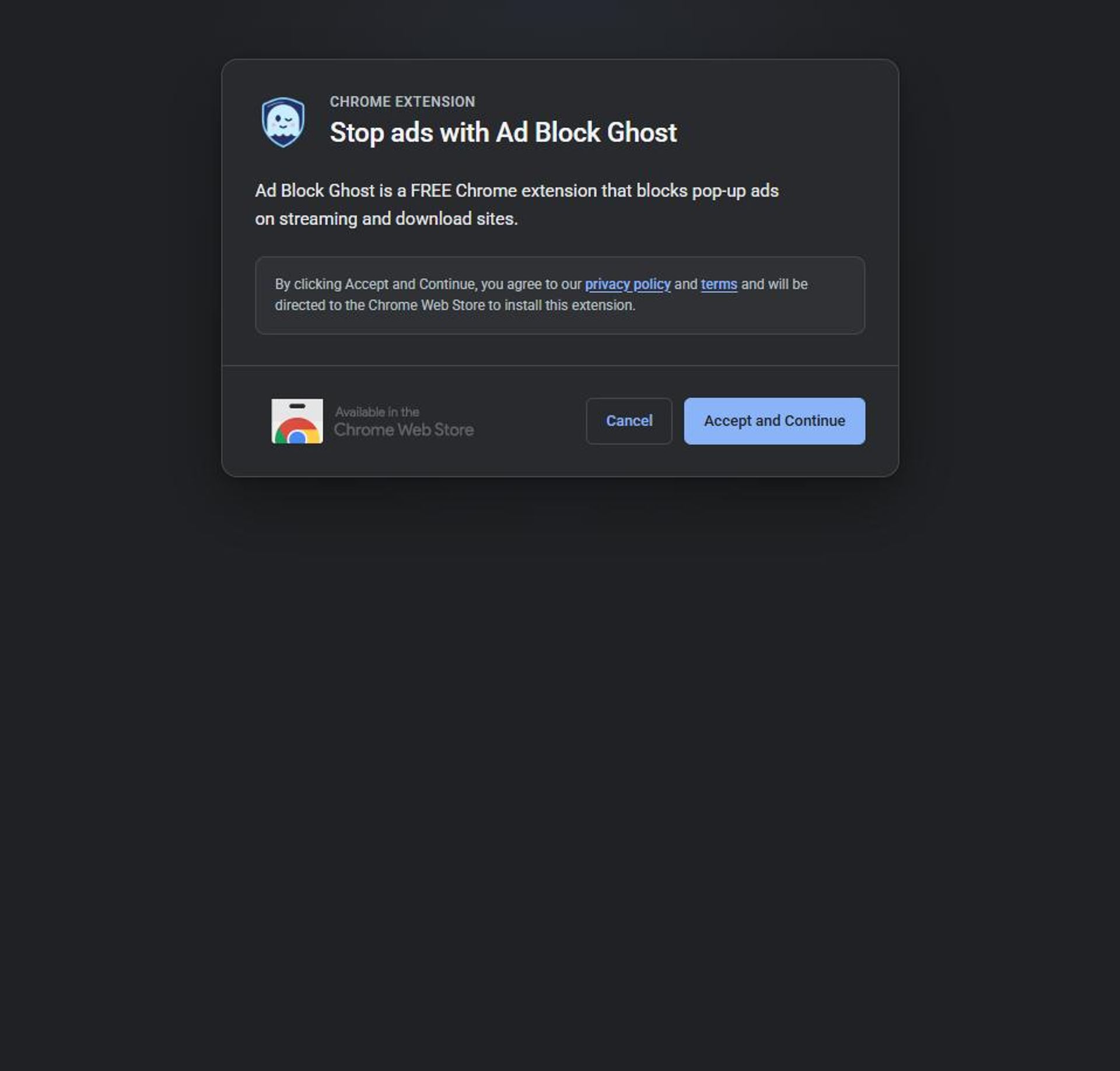
While poking at the campaign infrastructure, a second landing page on the same domain turned up - this one going even further, styling itself as a native Chrome interstitial (puzzle-piece icon, dark Chrome-style UI, tab titled "Extension Recommended - Chrome") instead of a generic ad:
https://wildfreedome.com/chrome-security.html?an=ac&cid=REDACTED&sid=REDACTED
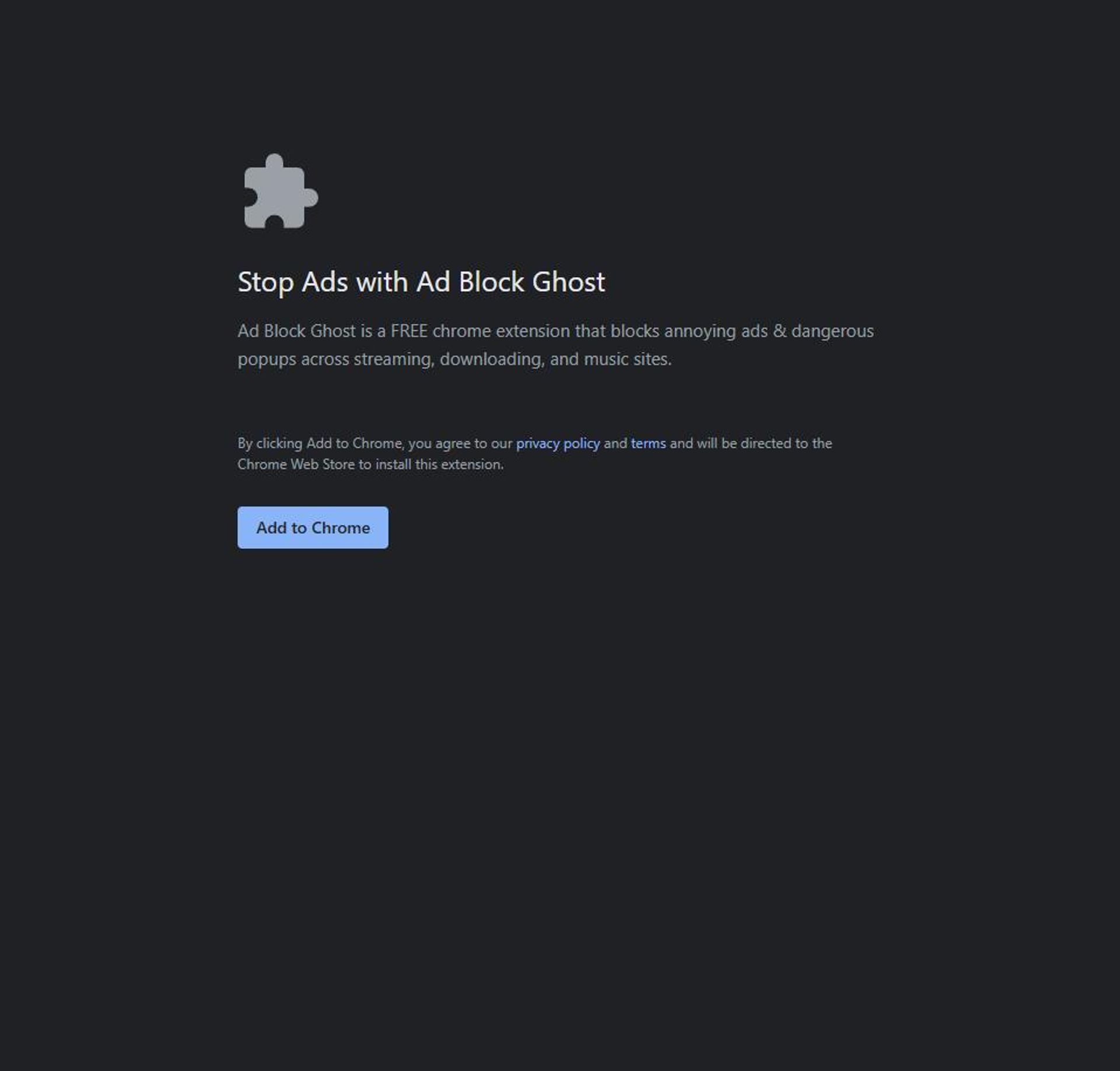
Both pages point at the same extension and the same backend, just with different disguises depending on which ad slot served the click. I pulled both pages apart, downloaded the actual extension package straight from Google's update servers, and reverse engineered it. Here's what's inside.
Step 1: The Landing Pages #
Both audio-voice.html and chrome-security.html are static pages hosted on wildfreedome.com, a domain registered 11 days ago (2026-09-29) through Hostinger and fronted by Cloudflare. Their only job is to look trustworthy enough for a click.
Pulling the page source and its JS (js/audio-voice.js / js/chrome-security.js) shows both templates are driven by the same logic, just with different localized copy for 20+ languages:
const openAdCheck = () => {
  const redirectParams = new URLSearchParams({ an: adNetwork, cid: campaignId, sid: sessionId, po: partnerOption });
  window.open(`https://adblockghost.com/re.php?${redirectParams.toString()}`, "",
    `width=${window.outerWidth},height=${window.outerHeight},top=${window.screenY},left=${window.screenX}`);
};
Clicking anywhere that looks like a button - "Accept and Continue," "Add to Chrome," even the Chrome Web Store badge image - fires the same openAdCheck() call. There's no "no thanks" that doesn't also forward your click ID to the backend; only the explicit "Cancel" button bails out (to google.com).
The other interesting bit is the self-polling installed-check:
const checkIcon = () => {
  clearTimeout(checkTimeout);
  fetch("chrome-extension://donodhjdnkockalocpljpfahelbfoacc/assets/icon.png", { method: "GET" })
    .then(response => {
      if (!response.ok) throw new Error("Icon check failed");
      setTimeout(() => { window.location.href = "https://google.com"; }, 1000);
    })
    .catch(() => { checkTimeout = setTimeout(checkIcon, 1000); });
};
This abuses web_accessible_resources to fingerprint whether the extension (ID donodhjdnkockalocpljpfahelbfoacc) is already installed, by trying to fetch one of its own bundled assets every second. The moment it resolves, the page bounces to google.com - presumably so the ad network's conversion pixel sees a clean "success" redirect rather than a user just sitting on an install page.
Step 2: Following the Click - re.php #
Clicking through hits https://adblockghost.com/re.php:
HTTP/1.1 302 Found
Set-Cookie: an=ac; expires=...; domain=.adblockghost.com; secure; HttpOnly; SameSite=None
Set-Cookie: cid=REDACTED; expires=...; domain=.adblockghost.com
Set-Cookie: sid=REDACTED; expires=...; domain=.adblockghost.com
location: https://chromewebstore.google.com/detail/donodhjdnkockalocpljpfahelbfoacc/reviews?an=ac&cid=...&sid=...
So re.php is a pure click-attribution relay: it drops first-party an/cid/sid cookies (ad network, campaign ID, session ID) scoped to .adblockghost.com with a 300-day lifetime, then forwards to the real Chrome Web Store listing - still carrying the same tracking params in the query string, which (as we'll see) the extension itself goes looking for after install.
Step 3: Pulling the Real Extension #
Rather than relying on the Chrome Web Store's listing page, I grabbed the actual CRX straight from Google's own update endpoint:
curl -s -L "https://clients2.google.com/service/update2/crx?response=redirect&acceptformat=crx3&prodversion=130.0.0.0&x=id%3Ddonodhjdnkockalocpljpfahelbfoacc%26uc" -o adblockghost.crx
A CRX3 file is just a header glued onto a normal ZIP - strip everything up to the PK\x03\x04 magic bytes and unzip handles the rest. What came out was far more sophisticated than the previous shady ad-blocker I tore apart: a legitimate-looking, uBlock Origin-style filtering engine (declarativeNetRequest rules, a scriptlet injector with ~90 bundled anti-adblock-detection presets, cosmetic filtering, a popup blocker) - with a full telemetry pipeline bolted on top.
The Manifest #
{
  "manifest_version": 3,
  "version": "2.1",
  "permissions": ["declarativeNetRequest", "scripting", "storage", "activeTab", "unlimitedStorage", "webNavigation"],
  "host_permissions": ["<all_urls>"],
  "background": { "service_worker": "src/ghost.js" },
  "web_accessible_resources": [{
    "resources": ["src/ui/popup-tracker/popup-tracker.html", "assets/icon.png", "web_accessible_resources/*"],
    "matches": ["<all_urls>"]
  }]
}
<all_urls> host permissions plus a content script injected document_start on every page confirms this extension can see and modify everything you browse - expected for an ad blocker, but worth keeping in mind for what comes next.
Hiding Its Own Logs #
src/ghost.js, the service worker entry point, opens with this:
const __rawDebug = console.debug.bind(console);
const __emit = (tag, args) => { try { __rawDebug.apply(null, tag ? [tag, ...args] : args); } catch (e) {} };
console.log   = (...args) => __emit(null, args);
console.info  = (...args) => __emit(null, args);
console.debug = (...args) => __emit(null, args);
console.warn  = (...args) => __emit('[WARN]', args);
console.error = (...args) => __emit('[ERROR]', args);
Every console.log/warn/error call in the extension gets silently rerouted through console.debug, which Chrome's DevTools hides by default unless you manually flip the console's log level to "Verbose." The code comments elsewhere even say this outright ("visible only at DevTools' 'Verbose' level"). It's not breaking anything, but it's a deliberate choice to make the extension quieter to anyone poking around in the inspector - including a researcher.
Install-Time Attribution Harvest #
src/features/telemetry/telemetry.js runs captureInstallAttribution() on every fresh install:
async captureInstallAttribution() {
    const allTabs = await new Promise(res => chrome.tabs.query({}, res));
    const domains = new Set();
    const attrs = {};
    for (const tab of allTabs || []) {
        if (!tab.url) continue;
        const urlObj = new URL(tab.url);
        const host = urlObj.hostname.replace(/^www\./, '').toLowerCase();
        if (host) domains.add(host);
        if (tab.url.includes('chromewebstore.google.com') && tab.url.includes('an')) {
            for (const [k, v] of urlObj.searchParams.entries()) attrs[k] = v;
        }
    }
    if (domains.size) batch['ghost_install_sites'] = [...domains];
    for (const k of ['an', 'cid', 'sid']) if (attrs[k] != null) batch[k] = attrs[k];
    await chrome.storage.local.set(batch);
}
Exactly like the "re.php" trail set up: the extension scans every open tab at install time, snapshots every domain you currently have open, then specifically goes looking at your Chrome Web Store tab for the an/cid/sid query params the ad redirect left behind - stitching your ad click back to your install, and your install back to a live inventory of what you were browsing at the time.
Hardware & Behavioral Fingerprinting #
src/content/content.js runs on every page load and builds a device fingerprint far more detailed than you'd expect from an ad blocker:
return {
cpu_cores: navigator.hardwareConcurrency || 'unknown',
ram_gb: navigator.deviceMemory || 'unknown',
gpu_vendor: gpu.vendor,
gpu_renderer: gpu.renderer,
canvas_data: getCanvas2DHash(),
audio_fp: audioFp,
gl_ext_count: glExtCount,
webdriver_present: navigator.webdriver ? 1 : 0,
screen_res: `${screen.width}x${screen.height}`,
user_agent: navigator.userAgent,
bat_charging: batCharging,
bat_level: batLevel,
an: attrs.an || null, cid: attrs.cid || null, sid: attrs.sid || null
};
Canvas 2D hashing, an OfflineAudioContext/oscillator audio fingerprint, and a WebGL extension count are all classic browser-fingerprinting techniques - none of which are necessary to block ads. The one that stood out most is webdriver_present: it directly checks navigator.webdriver, the flag Selenium/Puppeteer/Playwright (and a lot of reverse-engineering tooling) sets on automated browsers. The extension ships that bit straight to its server with every fingerprint payload - a tidy way to flag sandboxes, bots, and researchers separately from real users.
Shipping It All Home #
telemetry.js bundles the fingerprint, install-site snapshot, a running tally of every domain you visit (ghost_visited_sites, capped at 50 but persisted indefinitely), and the ad attribution IDs into one payload and POSTs it on a schedule (every 3 hours by default, with a 30-minute retry backoff):
BACKEND_URL: 'https://adblockghost.com/ext-server-1026.php',
FAREWELL_URL: 'https://adblockghost.com/ext-uninstall.php',
...
response = await fetch(this.BACKEND_URL, {
    method: 'POST', credentials: 'include',
    body: JSON.stringify(payload), signal: ctrl.signal
});
It even calls chrome.runtime.setUninstallURL() pointed at ext-uninstall.php?extid=...&extv=...&uid=..., so removing the extension still phones home one last time with your fingerprint ID. Both endpoints are live and returning 200/302 as of this writing.
Step 4: The Privacy Policy - Honesty by Burying It #
The previous shady ad-blocker I looked at flatly lied, claiming it "does not collect or use your data" while quietly exfiltrating browsing history. Ad Block Ghost does the opposite - its privacy policy at adblockghost.com/privacy.html actually spells most of this out, just wrapped in enough corporate padding that nobody will read it:
"During your initial setup of the extension, we record the domains currently open or present in your active browser tabs... Upon your initial installation, we securely generate and collect a unique browser footprint (explicitly including hardware-level Canvas graphics rendering data)."
And on retention:
"We do not impose any limits on how long we retain the information we collect, including your IP address, complete telemetry footprint, and installation data. We store this data indefinitely and reserve the right to process, apply, or use this accumulated information at our sole discretion, without restriction or limitation on how we do with it."
It also ships a "warrant canary" and a GDPR rights section - the kind of legal dressing that makes a policy look reassuring at a skim, while the actual text grants itself indefinite retention and unrestricted use of a canvas/audio/WebGL fingerprint, your install-time tab list, and your ongoing browsing history. Nothing here is a false claim like the "Stop Ads" case - it's disclosed. It's just buried under four pages of filler nobody installing a browser extension is going to read, let alone parse for consent scope.
For good measure, the Terms of Service also include:
"You may not reverse engineer, decompile, or disassemble the extension."
Step 5: Infrastructure #
| Domain | Role | Registered | Registrar | Nameservers |
|---|
wildfreedome.com | Ad landing pages | 2026-09-29 (11 days old) | via Cloudflare | Cloudflare |
adblockghost.com | Redirector, backend API, privacy/terms pages | 2026-07-09 | via Cloudflare | Cloudflare |
Both domains resolve exclusively to Cloudflare proxy IPs, hiding the real origin server. The landing-page domain is brand new - consistent with the throwaway, rotate-often domains typical of malvertising campaigns - while the extension's own domain is a few months older, long enough to get a Chrome Web Store listing approved and accumulate install volume.
On the Chrome Web Store itself, the listing (Ad Block Ghost - Light and agile protection) claims 100,000 users and was last updated October 7, 2026 - two days before I looked at it. Notably, the listing shows no visible star rating or review count tied to the extension, despite the six-figure user count - a pattern consistent with installs driven almost entirely by paid ad traffic rather than organic discovery and genuine usage.
Chrome Web Store Policy Concerns #
- Deceptive ad creative impersonating Chrome's own UI. The
chrome-security.html variant borrows Chrome's puzzle-piece icon and dark interstitial styling to pass itself off as a native browser prompt rather than a third-party ad. - Fingerprinting beyond stated functionality. Canvas, WebGL, and audio-context fingerprinting are not required for content blocking and are disclosed only deep inside a four-page privacy policy - not surfaced anywhere in the actual install flow shown to the user.
- Indefinite, unrestricted data retention. The policy explicitly disclaims any retention limit and reserves unrestricted rights to "process, apply, or use" the data collected.
- Automation/researcher detection. Shipping
navigator.webdriver status alongside every fingerprint payload has no ad-blocking purpose; its only use is distinguishing real users from bots, sandboxes, or reviewers.
Summary #
Ad Block Ghost is a legitimately well-built ad-blocking engine wrapped around an aggressive telemetry and attribution layer, pushed through deceptive ad creative that impersonates Chrome's own install UI. Unlike the last shady extension I tore apart, it doesn't lie about what it collects - it just collects canvas/audio/WebGL fingerprints, your open tabs at install time, and your ongoing browsing history, discloses it in four pages of legalese nobody reads, and reserves the right to keep and use all of it forever. It's just another reminder not to install extensions from ad popups, and for IT teams to either restrict Chrome extension installs via policy or strictly monitor them.
Published